
Choosing between RingCentral vs Microsoft Teams depends on whether your business needs a complete virtual phone system or a platform highlighting chat messaging and video conferencing.
Let’s compare RingCentral vs Microsoft Teams and review each platform’s features, pricing, pros, cons, and use cases.
RingCentral vs Microsoft Teams at a Glance
RingCentral and Microsoft Teams solve different problems. RingCentral leads with a full phone system, bundling VoIP, team chat, and video into one UCaaS platform. Microsoft Teams leads with collaboration, offering chat and video but no built-in calling unless you add a Teams calling plan or third-party phone software.
Choose RingCentral If:
- You need a complete phone system with VoIP calling out of the box
- Call routing features like call queueing and IVR matter to your team
- You want real-time analytics and call monitoring built in
- Video meetings need breakout rooms, AI summaries, and live transcription for up to 200 participants
Choose Microsoft Teams If:
- Your team already runs on Microsoft 365 and lives in chat and video
- Collaboration matters more than telephony
- You're willing to buy a separate calling plan or integrate third-party phone software for voice
- You want a team collaboration hub rather than a unified communications platform
| RingCentral » | Microsoft Teams » | |
| Pricing | 3 UCaaS plans from $20 to $35 monthly per user | 3 collaboration plans from $4 to $12.50 monthly per user |
| Key Features |
|
|
| Available Communication Channels |
|
|
| Integrations | Cloud communications APIs and over 300 integrated apps, including:
|
Teams functionality APIs and over 700 integrated apps, including:
|
| Best For | Teams prioritizing a phone system, especially those with large call volumes | Teams seeking chat and video for collaboration |
RingCentral vs Microsoft Teams: Pricing Overview
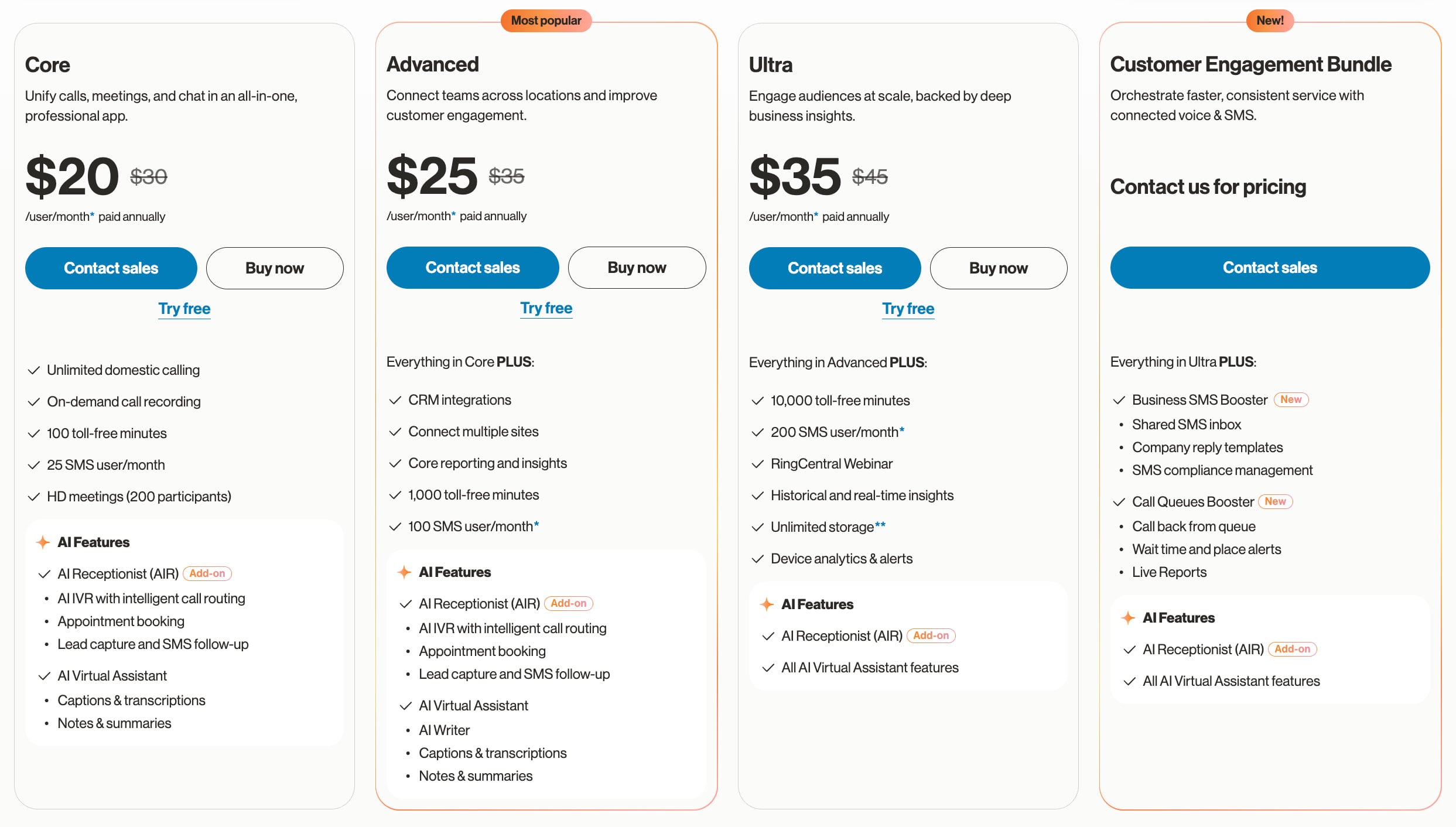
RingCentral offers four phone system pricing plans, which range from $20 to $35 monthly per user. Some AI features such as captions, transcriptions and AI Writer are included in certain plans, but RingCentral's AI Receptionist must be purchased as a separate add-on. Feature-bundled plans are as follows:
- Core ($20 monthly): Unlimited voice calling in the US and Canada, 25 monthly SMS per user, team chat, and video conferencing for 100 participants. Phone system has basic call queues and multi-level IVR and video meetings include collaborative tools like whiteboards, AI insights, and breakout rooms.
- Advanced ($25 monthly): Adds automatic call recording, call monitoring with whisper and barge, real-time analytics, 100 monthly SMS per user, and access to over 300 integrations
- Ultra ($35 monthly): Adds unlimited HD video and whiteboards, advanced and custom analytics, 200 monthly SMS per user, and unlimited file sharing
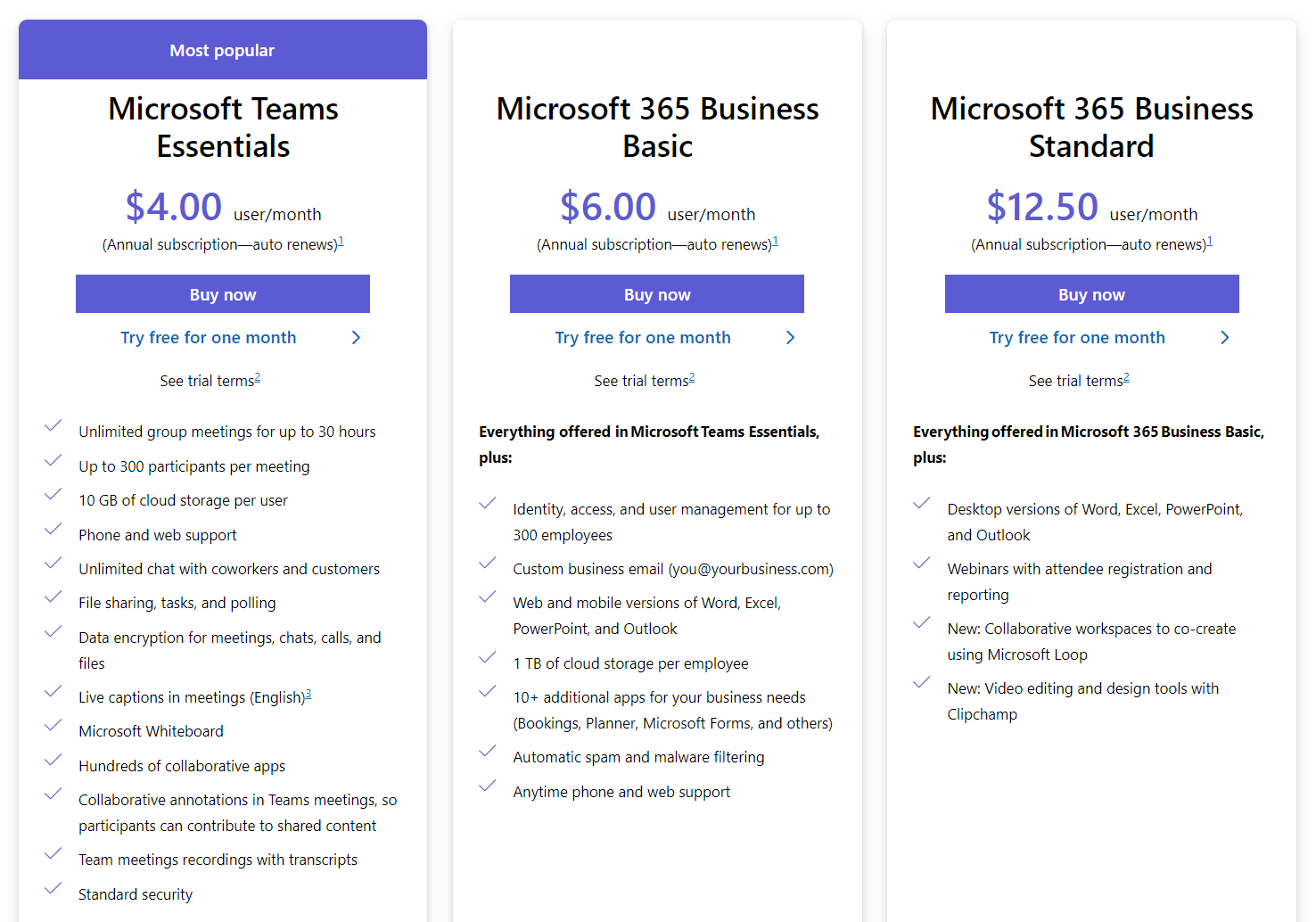
Microsoft Teams offers six total plans–three collaboration-app plans and three bundled phone plans. Plans range from $4 to $18 monthly per user.
- Microsoft Teams Essentials ($4 monthly): Team chat and 30-hour video meetings with up to 300 participants. 10 GB cloud storage per user, live meeting captions, whiteboards, file sharing, task assignment, and polling
- Microsoft 365 Business Basic ($6 monthly): Custom business email addresses, 1 TB cloud storage per user
- Microsoft 365 Business Standard ($12.50 monthly): Desktop versions of Microsoft Office apps like Word and PowerPoint, webinars with attendee management, video editing tools
- Teams Phone Standard Add-on ($10 monthly): Cloud-based calling solution native to Teams–includes queuing, auto attendant, call transcription, video, and team chat
- Teams Phone Pay-As-You-Go Bundle ($10 monthly): Pay-as-you-go calling plan with call queuing, auto attendant, call transcription
- Teams Phone Domestic Bundle ($17 monthly): Domestic calling plan with 3,000 monthly minutes inside the US, UK, and Canada–or 1,200 monthly minutes elsewhere around the world
Keep in mind that the base Teams Phone license is included with Microsoft 365 E5. Businesses already subscribed to E5 may only need to add a carrier calling plan rather than pay for a separate phone bundle, which can meaningfully change the total cost compared with the per-plan pricing listed above.
RingCentral vs Microsoft Teams: Feature Comparison
Below, we’ve compared key features for RingCentral vs Microsoft Teams:
Phone System
Summary: RingCentral’s phone system offers more advanced features like call monitoring and real-time analytics, while Microsoft Teams offers business phone numbers from more countries.
RingCentral Phone System
RingCentral’s virtual phone system includes routing, queueing, and voicemail features. Get set up in minutes with local, toll-free, and vanity business phone numbers around the world, or port in pre-existing numbers. All RingCentral plans include unlimited HD voice calls within the US and Canada.
The RingCentral network provides full calling service in over 45 countries, with inbound call reception in over 105 countries.
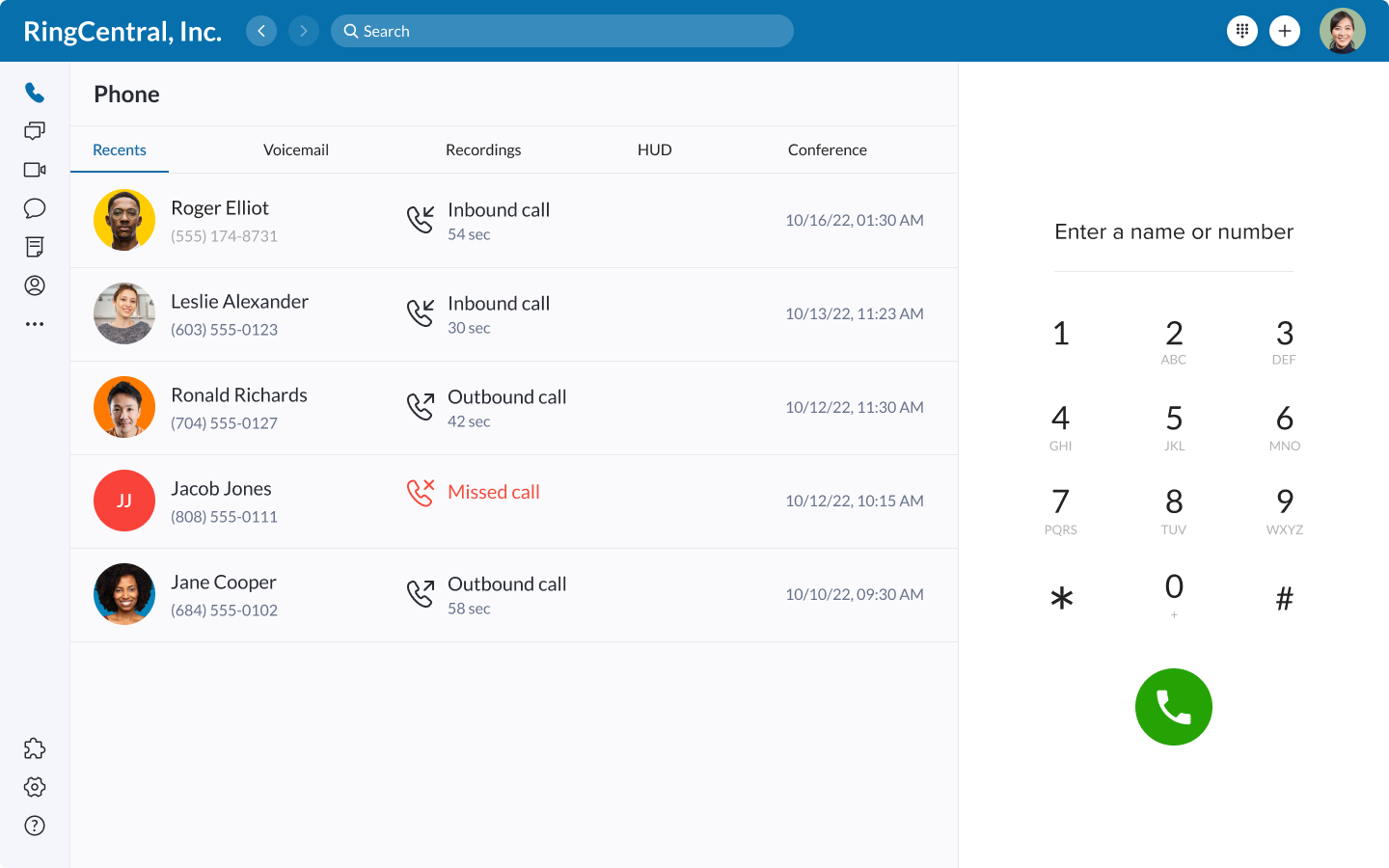
Use the RingCentral app to make calls from any device, or flip between devices on call. Administrators can manage queue settings, customize call handling, and retain a live view of call center activity with real-time analytics.
RingCentral Phone System Features:
- Multi-level auto attendant: A self-service phone menu that routes customers to the correct user. Customize menu options and submenus, using typed announcements or recorded audio files.
- Visual voicemail: A searchable voicemail log with voicemail transcriptions. Users can automatically forward voicemail audio and transcriptions to email and SMS.
- Advanced call handling: Administrators can monitor calls, whisper privately to an agent, barge into the call, or take it over entirely.
- Unlimited conference calls: With up to 1000 attendees per conference
- Call management features: In addition to call flip, agents can utilize call forwarding, transfer, screening, and call park
- Call queues: Group agents together to share particular types of inbound calls. Queues can support up to 25 simultaneous customers on hold.
- Ring groups: Instead of placing customers on hold like a queue, ring groups allow you to customize ring order and ring time. Ring styles include round robin, simultaneous ring, or custom sequential order.
- Business phone numbers: RingCentral offers DID numbers from roughly 100 countries worldwide
- Call recording: Select on-demand or automatic call recording, storing recordings in the app
- Call monitoring: Supervisors can monitor calls by listening in quietly, joining the call, or taking it over entirely
Microsoft Teams Phone System
Microsoft Teams Phone is a cloud-based phone system with basic routing features, plus flexible provider and network options.
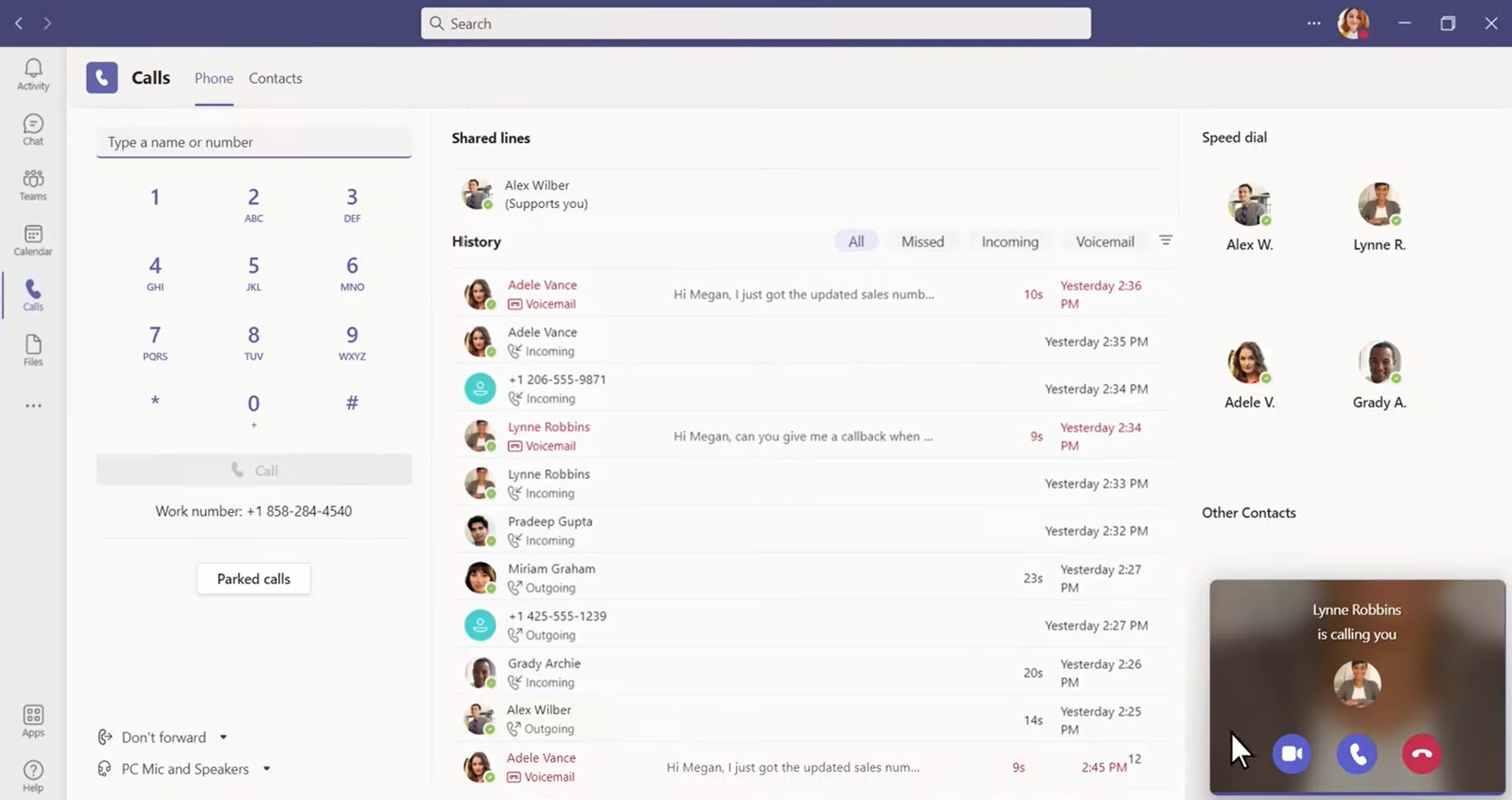
With Microsoft’s Operator Connect feature, integrate your own operator with the Teams Phone app. This option allows you to take advantage of Teams Phone routing and voicemail features, with VoIP and PSTN calling that utilizes your on-premise PBX system. Or, integrate the mobile provider you already use, adding mobile identities and phone numbers to Teams.
Alternatively, companies can use Microsoft as a VoIP provider, to purchase business numbers around the globe–including toll-free and vanity numbers. Customize a routing system and call nearly any number around the world. Teams Phone offers a pay-per-minute plan or a domestic plan with preset monthly minutes and unlimited inbound calls.
Microsoft Teams Phone Features:
- App interface: The Calls tab displays a dial pad, call log, contact list, and parked calls section
- Call management: Merge, hold, park, and transfer live calls with one click
- Device transfer: Flip calls between devices instantly
- Voicemail: Visual voicemail inbox with playback and transcription
- Call recording and transcription: Live transcription with playback options afterward
- Live call health: Agents can view call audio quality and performance in real-time, within the call window
- Call logs: Searchable records of call details including time of day, duration, caller, and recipient
- Business phone numbers: RingCentral offers business phone numbers in 196 countries globally–a larger offering than most other VoIP providers
- Auto attendants: Automatically routes calls to the right agent, department, or voicemail box based on caller input and preset routing rules
- Call queues: Create separate waiting lines for different departments and agents to be answered in the order received
- Ring groups: Incoming calls ring several numbers simultaneously
Team Messaging
Summary: RingCentral team messaging includes helpful task assignment and file storage features, while Microsoft Teams offers richer message-formatting options and video-messaging capabilities.
RingCentral Team Messaging
Use the RingCentral MVP app to chat, participate in group channels and threads, share files, manage tasks, create events, and collaborate on shared documents.
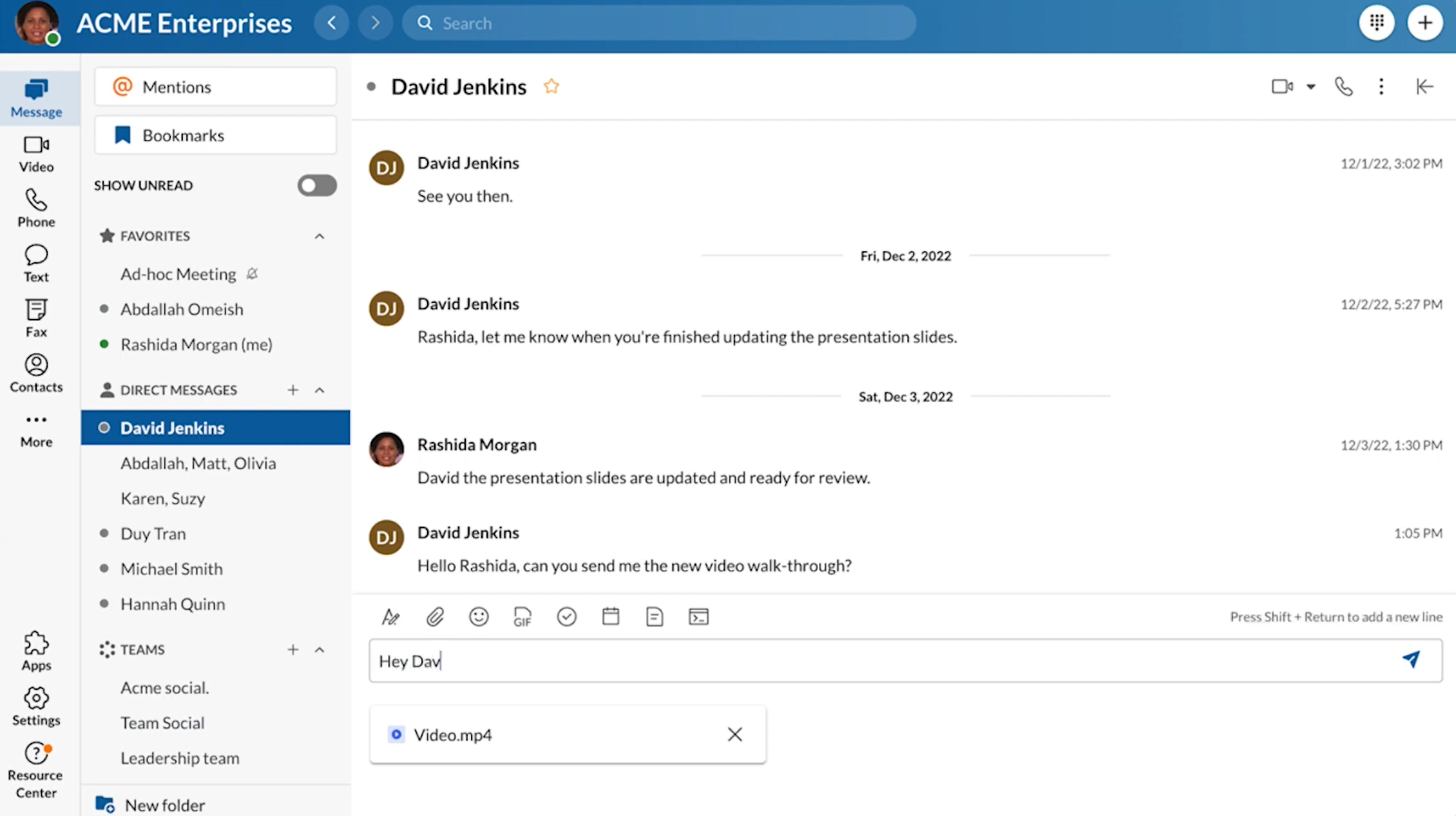
Create 1:1 chats, group chats, and add external members by email. Within a chat, start side threads, share gifs, react with emojis, and customize font. Connect hundreds of apps–including DocuSign, DropBox, and Google Workspace–to share dynamic files accessible directly from the chat thread.
Stay organized by bookmarking, pinning, or creating folders for files and messages. Use the search bar to filter conversation history by keyword, participant, or file.
Use one-click buttons to jump into an ad hoc team huddle, schedule a video meeting directly within chat, start an audio call, or share your screen. Create color-coded, interactive task lists to keep team members updated.
Microsoft Teams Messaging
Microsoft Teams chat offers rich text-formatting and sharing options.
Create 1:1 and group chats with one click, adding new users simply by typing their names. All conversations are organized on the left-hand menu.
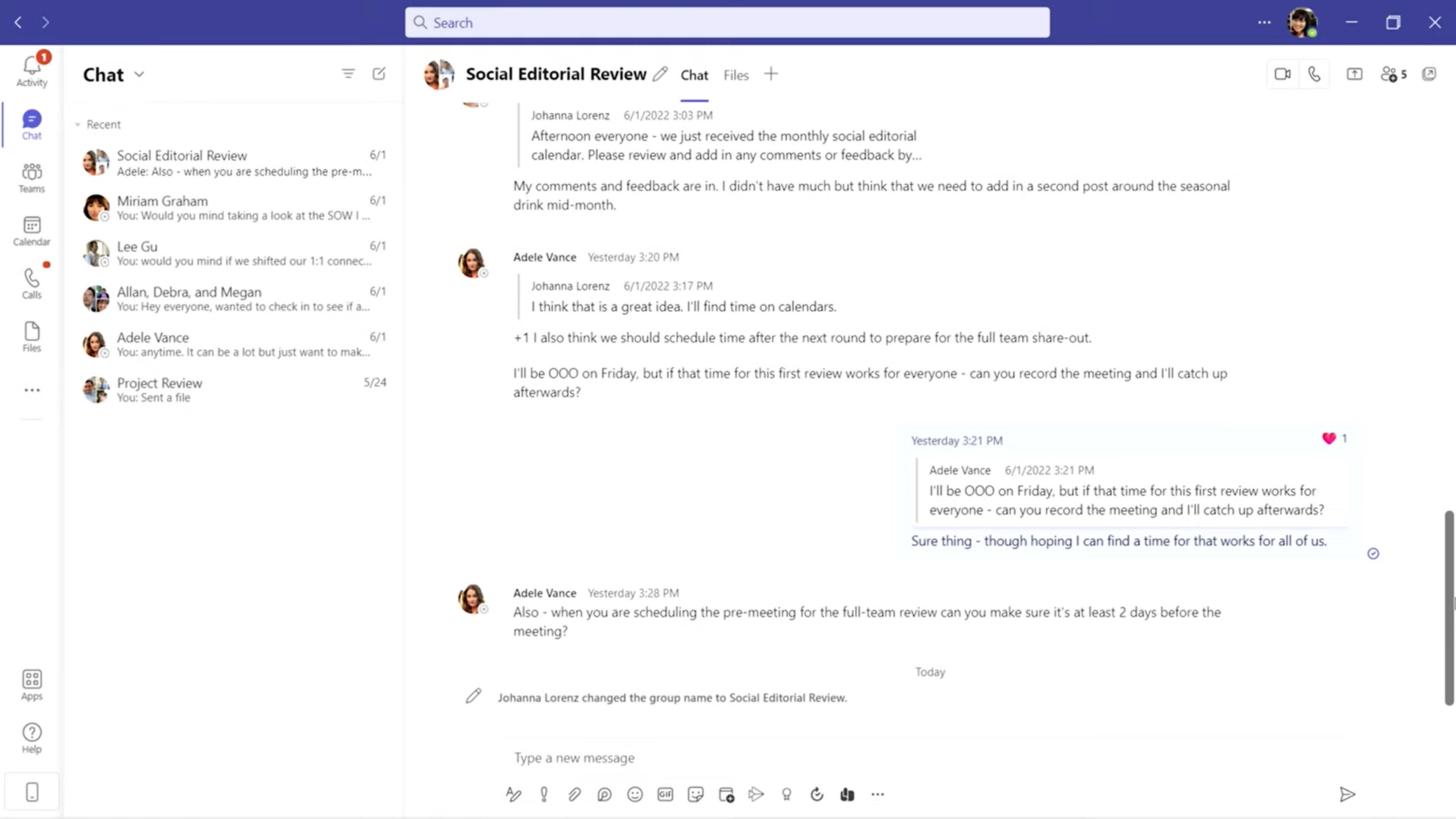
Send files, emojis, gifs, stickers, calendar invites, and collaborate on tools like whiteboards. Translate, share, bookmark, and save messages with one click. Mute or pin conversations, customize notification settings, and manage read receipts.
Search a conversation’s shared files and save them to your personal OneDrive. In your OneDrive app, sort files into Shared with You and Shared by You.
Other Microsoft Teams Chat Features:
- Rich message formatting: Custom font and size, bolding, highlighters, and inserted links
- Visual planning tools: Within chat, create an interactive table, checklist, bulleted or numbered list, or task list
- Video clips: Quickly record, trim, and send video clips for a personal touch
- Chat with self: Ideal for notes and storing message drafts
- Schedule send: Schedule messages, calendar invites, and announcements
- Threads: Create message threads that don’t derail the larger conversation
- Escalation: One-click escalation to video or audio call
File Sharing and Collaboration in Microsoft Teams Chat
Use Teams to store, share, and co-edit documents through channels, chat, or video meetings. With Microsoft SharePoint and OneNote embedded into Teams, share documents from Microsoft 365 apps like Word, Excel, and PowerPoint.
Manage file access and co-author a document with dozens of teammates at once, while chatting or participating in a video meeting on the side. All documents remain organized in OneNote and your Files tab.
Video Conferencing
Summary: RingCentral and Microsoft Teams both offer interactive meetings with useful tools like breakout rooms, live transcriptions, and AI-based summaries. While RingCentral offers more insightful post-meeting summaries, Microsoft Teams offers more dynamic document co-editing.
RingCentral Video Conferencing
Create and host HD video meetings with up to 200 participants and no time limit. Join from any device or directly from a call or chat–no download required.
Create recurring meetings, set meeting details, invite participants, and schedule meetings in integrated calendar apps like Outlook or Google. Each new meeting generates a password and invite link. This ease of use and potential for customer collaboration is part of why video conferencing is expected to continue with a 12.5% annual growth rate over the next 8 years.
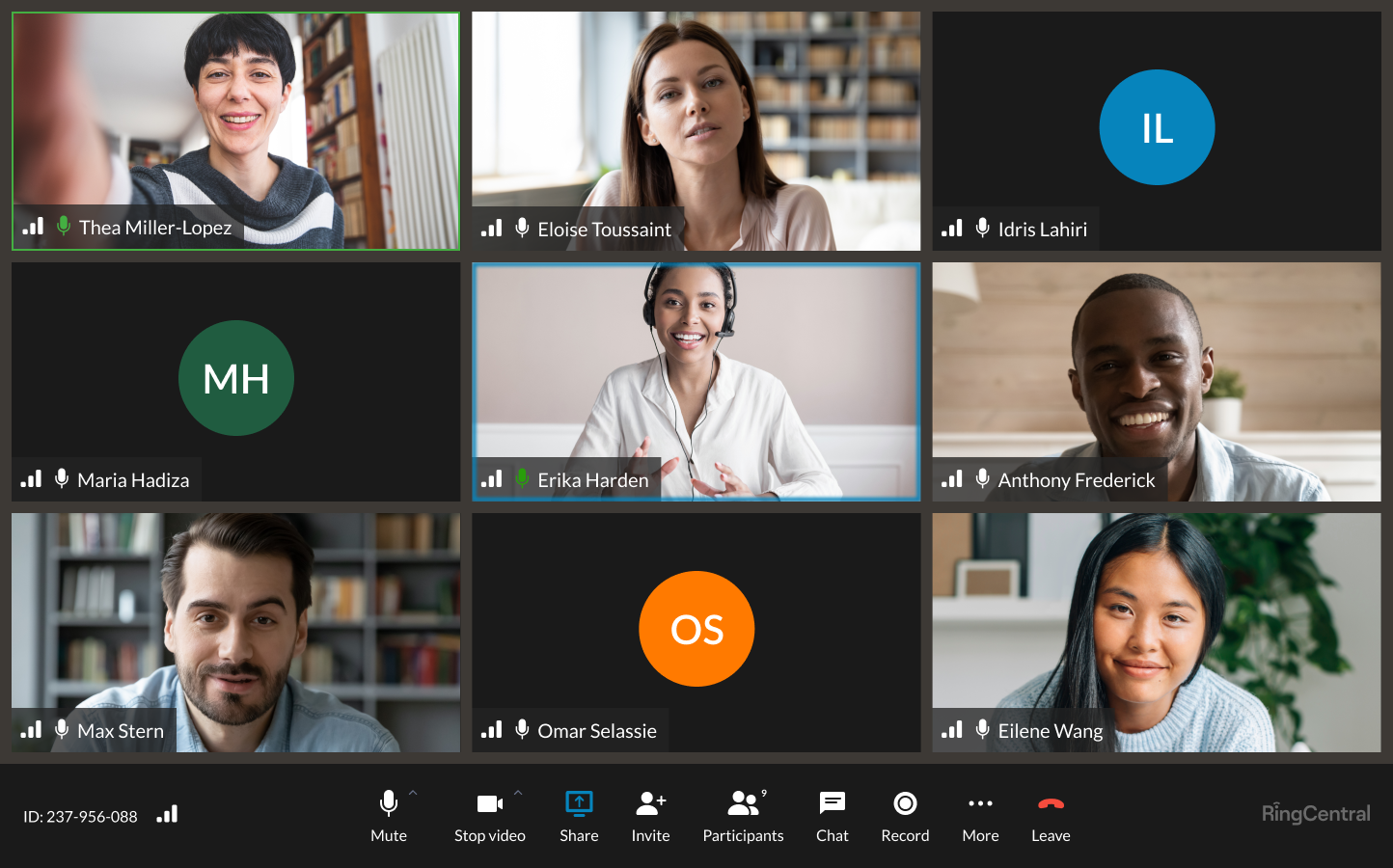
RingCentral Video Meetings Features:
- Advanced meeting insights: AI-generated meeting recaps including summaries, highlights, topics discussed, keywords, and transcripts. Insights are accessible in the Videos tab and relevant team chat channels.
- Live transcription: Captions include speaker identification to know who said what, even within large groups
- Integrated camera: The presenter can integrate their video within the presented content, choosing where they’d like to appear
- Auto-follow: The camera follows the presenter’s movements
- Breakout rooms: Split participants into smaller groups for brainstorming and collaboration
- Noise Reduction: AI-powered background noise reduction
- Participant emoji reactions: Participants can react with common emojis during meetings
- Digital collaborative whiteboard: Includes brainstorming tools such as sticky notes, drawing tools, etc.
Microsoft Teams Video Conferencing
Schedule and join HD-video meetings within the Microsoft Teams desktop and mobile app interface. Meetings support up to 300 internal or external participants, and the Business Standard plan supports webinars with up to 1000 attendees. Meetings and virtual events have a 30-hour time limit. In-meeting chat, on-demand or automatic meeting recording, custom backgrounds, and virtual hand-raising are also available.
In the Teams Calendar tab, customize meeting details including title, date, schedule, and location. Share the meeting on any team channel and attach an agenda, notes, or task list. Users can join meetings directly from channels, chats, or shareable link.
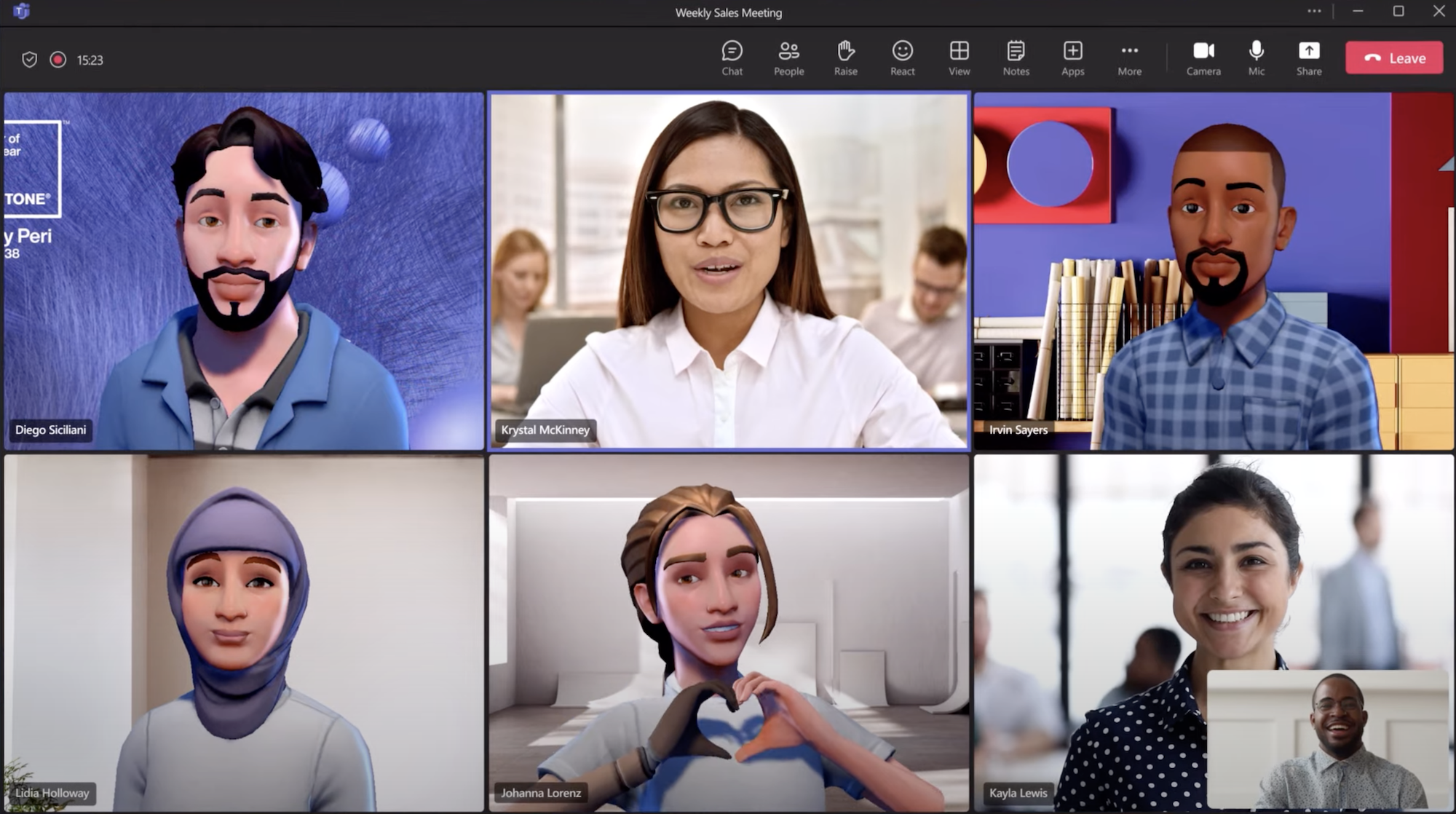
Top Microsoft Teams Video Meetings Features:
- Together mode: An immersive digital background that displays all participants in a shared virtual setting and lets hosts assign attendee seats
- Live presentations: Each viewer’s device has its own interactive slide deck with multi-lingual live subtitles, “pinch to zoom,” and slide scrolling. One-click audience feedback and post-meeting surveys are also available.
- Meeting recap: Summaries are accessible in teams channels or the Videos tab and include the audio recording, transcript, and any collaborative in-meeting files like notes, whiteboards, documents, etc.
- Live captions: Including translation into 40 languages
- Speaker coach: Real-time AI speaker assistance and performance feedback, including speaker pacing, audience check-in reminders, etc.
- Live collaboration: Like in chat, video teams can co-author web-based documents in programs like Word, Excel, and PowerPoint
- Screen sharing: Hosts can assign co-presenters to manage slide transitions. If enabled, audience members can scroll forward and backward through the slide deck.
- Collaborative annotation: Multiple team members can collaborate on screen-shared content or whiteboards with text, sticky notes, reactions, and digital ink
Reporting and Analytics
Summary: RingCentral offers advanced real-time business analytics that covers queue reports and agent performance, while Microsoft Teams offers more basic team usage reports and call logs.
RingCentral Reporting and Analytics
RingCentral real-time and historical analytics include KPIs monitoring agent performance, channel usage, and quality of service. Use pre-built report templates, design your own, automate reporting intervals, and instantly send reports to select users.
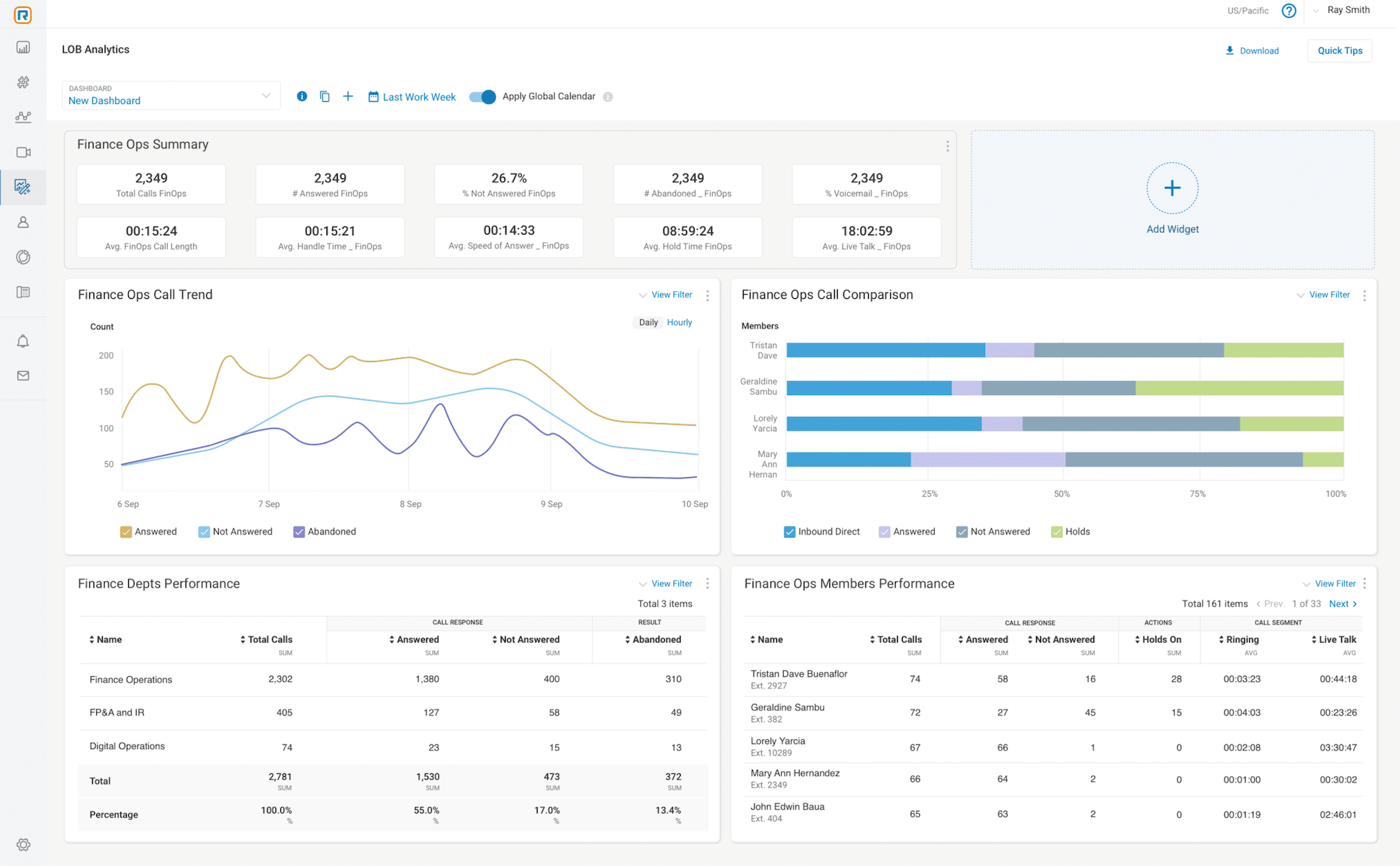
RingCentral Live and Historical Reports:
- Real-time queue dashboards: A bird’s-eye-view of call volume, active vs available agents, service level rating, number of customers on hold, abandoned vs answered calls, etc.
- Agent performance: Calls answered, calls missed, inbound and outbound call volume, average talk time, hold time, and handle time
- Performance summaries: A grid view comparing general call statistics for agents and locations
- Quality of service reports: Overall quality score of calls and meetings, quality scores of individual devices, and trends in quality vs volume
- Adoption trends: Total messages sent, video meetings hosted, inbound and outbound calls made, and company employees actively using each channel
Microsoft Teams Reporting and Analytics
Microsoft Teams offers historical reports and insights about channel usage and user activity.
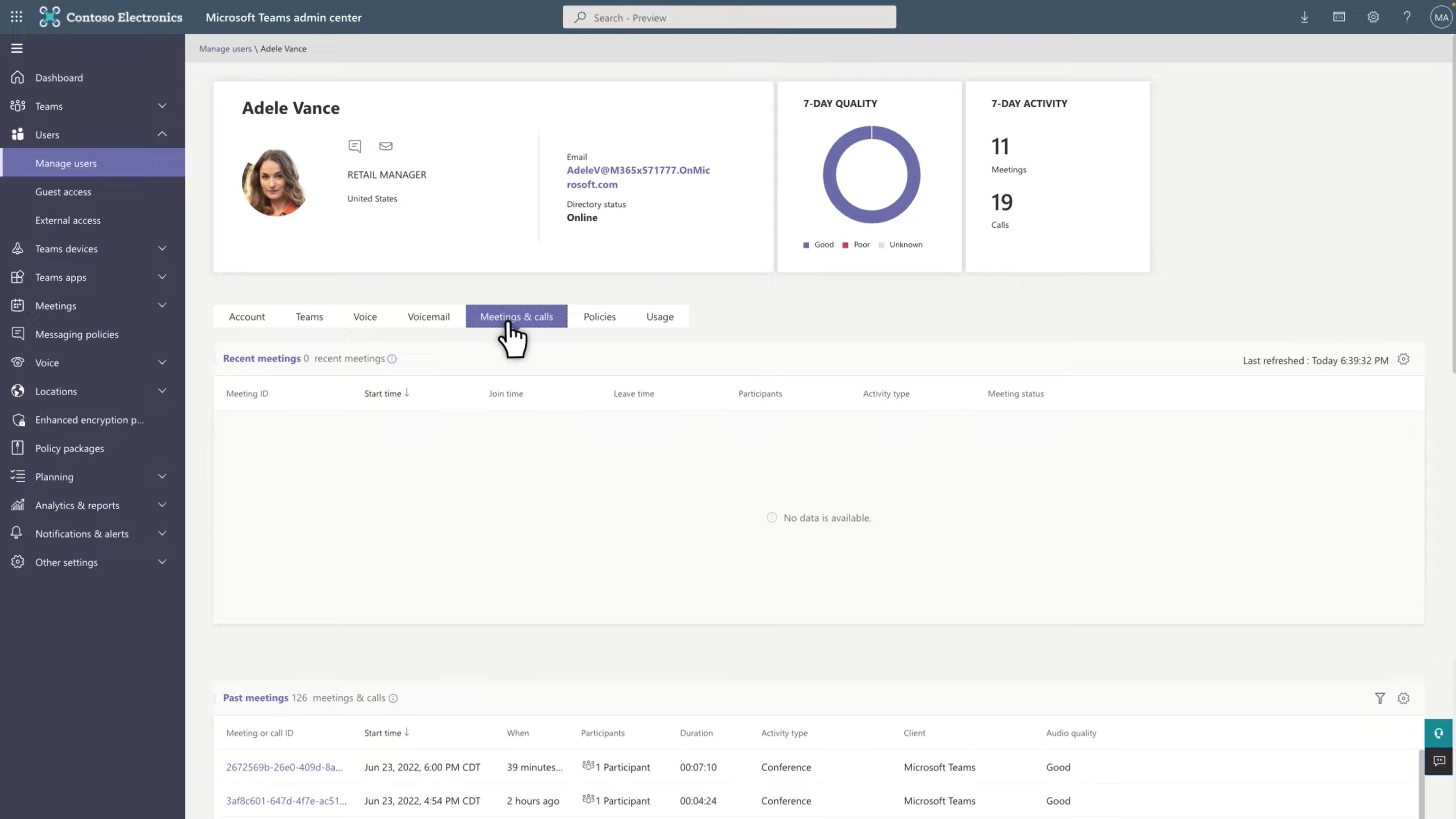
Microsoft Teams Reports:
- Teams usage report: Measures the total number of active users, active users within each channel and team, the number of active channels, and the number of messages sent
- User activity report: Measures the total number of active internal users and the following for each user–number of messages sent, calls made, meetings participated, and last activity date
- Device usage report: Measures how many users access the Teams app from each type of device
- Live event report: For each event–total views, start time, organizer, presenter, and more
RingCentral and Teams Pros & Cons
RingCentral Pros
- Real-time queue reports give supervisors live visibility into call volume, wait times, and agent availability, which matters for support and sales teams running structured queues.
- No time limit on video meetings, so longer client calls and all-hands sessions don't get cut off.
- More than 300 prebuilt integrations, including Salesforce, HubSpot, and Microsoft 365, plus an open API for custom builds.
- Reviewers on G2 consistently praise call quality and uptime, with RingCentral holding a 4.0 out of 5 rating across thousands of reviews as of early 2026.
RingCentral Cons
- AI Receptionist is not included in any of the plans and must be purchased as an add-on
- Pricing sits above many competitors, especially once you layer on add-ons like additional toll-free minutes or advanced contact center features.
- Reviewers note that the admin portal has a learning curve, and number porting can take longer than expected.
Microsoft Teams Pros
- Built-in file collaboration through SharePoint and OneDrive means documents live inside the chat where the work happens.
- Live speaker coaching and meeting recap features use AI to flag pacing, filler words, and action items.
- Rich message formatting, threaded replies, and Copilot assistance make async collaboration easier for distributed teams.
- Reviewers frequently cite the value of having chat, meetings, and files in one place, particularly for organizations already on Microsoft 365.
Microsoft Teams Cons
- The phone system (Teams Phone) is licensed separately from the collaboration tools, so calling capabilities add cost on top of your existing plan.
- Native call analytics are limited compared with dedicated VoIP platforms, which pushes some admins toward third-party reporting.
- Reviewers report performance lag and notification overload, and the sprawl of connected Microsoft apps can overwhelm new users.
Does RingCentral Integrate With Microsoft Teams?
RingCentral connects with Microsoft Teams through several paths, so businesses running both platforms can keep Teams as their collaboration hub while adding RingCentral’s calling capabilities. These are the connectivity options most buyers weigh when deciding how to run the two together:
- Embedded RingCentral app inside Teams: Adds the RingCentral app directly within the Teams interface. Users place and receive calls, text, and send faxes without leaving Teams, and they keep access to RingCentral’s advanced calling controls and analytics.
- Direct Routing: Connects RingCentral’s carrier network to Teams Phone through certified Session Border Controllers. This routes PSTN calls through RingCentral while users dial from the native Teams calling experience.
- Operator Connect: Provisions RingCentral as your operator inside the Teams admin center. This is the lowest-effort path, since it requires no SBC hardware and lets you manage numbers and calling plans from within Teams.
Each path unlocks RingCentral’s advanced calling, real-time analytics, SMS, and fax inside the Microsoft Teams environment, letting you pair Teams collaboration with RingCentral telephony rather than choosing one over the other.
Migrating Between RingCentral and Microsoft Teams
Switching between RingCentral and Microsoft Teams involves more than comparing features. Here is what the move typically requires:
- Consolidating tools: Audit the apps each platform replaces so you don’t pay for overlapping chat, video, or calling services during and after the transition.
- Number porting: Plan to port existing business numbers to the new provider. Porting can take several business days, so keep both systems active until numbers transfer cleanly.
- Avoiding extra hardware and SBC costs: Operator Connect and cloud-native calling can remove the need for on-premise Session Border Controllers, while Direct Routing or legacy PBX setups may add hardware expense. Factor these into the switching budget.
Understanding this switching effort, alongside the feature and pricing differences, gives you a clearer picture of the real cost and timeline of moving between the two platforms.
Which Phone System Should You Choose?
The best phone system for your company depends on your size, budget, and communication goals.
If your team’s main priorities are phone services like VoIP calling and routing, but you still want additional communication tools like chat and video, RingCentral’s multichannel pricing plans make a good option. With collaborative and customer-facing communication features, it makes sense why the UCaaS industry is experiencing a 13.9% annual growth rate.
Alternatively, if you want a collaboration platform with only video and chat, Microsoft Teams beats all competitors. Teams already using multiple Microsoft 365 apps–like Word, PowerPoint, and Excel–will appreciate Microsoft’s web-based co-authoring with those tools. Those with low call volumes should look to Teams Phone for pay-as-you-go options. If based outside the US or Canada, Teams Phone domestic options will fit your needs.