What is a Unified Communications System?

What Is Unified Communications?
Unified Communications (UC) is a business communications platform that combines voice and digital communication channels with team collaboration tools in a single interface.
It supports external channels like two-way voice and video calling, SMS, live website chat, and social media messaging. Internal collaboration features include team messaging, screen and file sharing, whiteboarding, and built-in analytics.
Unified Communications as a Service (UCaaS) enables users and customers to seamlessly switch between devices and communication channels during live interactions. This flexibility improves workflows, boosts productivity, and enhances the customer experience.
Integrations and custom APIs ensure interoperability with essential third-party tools such as CRM systems, contact center platforms, and webinar software. This reduces the need to constantly switch between apps.
How Does Unified Communications Work?
Unified communications works by connecting every channel, including voice, video, messaging, and SMS, to a single back-end platform that users access through one front-end client on desktop or mobile. Because all channels run on the same system, a conversation can move between them without anyone closing an app or starting over.
Here is a typical channel-switching scenario:
- A sales rep sends a teammate a quick question in team chat about a customer contract.
- The question turns complex, so the rep clicks a button to escalate the chat into a voice call inside the same app.
- They decide a third colleague needs to see the contract, so they turn the call into a video meeting and share their screen, all without leaving the platform.
- After the meeting, the AI assistant posts a summary and action items back into the original chat thread.
Behind the scenes, the platform ties into third-party business apps through integrations and APIs. When a call comes in, the system can pull up the matching CRM record, log the interaction automatically, and sync notes to a helpdesk ticket. This shared data layer is what lets presence, routing, and analytics work consistently across every channel.
Types of Unified Communications Systems
There are two main types of unified communication solutions: cloud-based and on-premises. Cloud-based UC systems are hosted and managed offsite, by the service provider, and are accessible from any Internet-enabled device and location. Therefore, cloud-based UCaaS solutions are best for mostly remote, geographically-diverse teams prioritizing mobility and scalability. On-premises UC systems are hosted and managed on site (in-office) by the end user, and are only accessible from the physical location where the server is installed. Therefore, on-premises UCaaS solutions are best for in-house teams prioritizing security and customizability.
Cloud-Based UC Systems
A cloud-based unified communications platform is hosted and managed by the service provider, not the end user, on an offsite cloud server.
Because cloud UC systems function via web-based applications instead of on-site servers, they’re not limited to a single physical location. The softphone interface is accessible from anywhere, and on any device, with a working Internet connection.
Advantages of cloud-based unified communications include:
- Affordability: Works with existing hardware or personal devices, no physical office space needed, upgrades and maintenance paid for by the provider
- Scalability: Offers scalable, pay-as-you-go plans with monthly and annual billing, individual add-on features, and extensive third-party integrations/APIs. Easily purchase more user seats, add monthly calling minutes or SMS/MMS messages, or upgrade your plan in minutes on the provider website
- Flexibility: Accessible on desktop and mobile devices in any location with Internet access, and users can flip between devices during active calls
Disadvantages of cloud-based unified communications include:
- Security: End users lack control over security features, data management, and system upgrades. Sharing server space with other businesses can pose security risks
- High-Speed Internet: Call quality is entirely dependent on the strength and quality of your Internet connection, meaning you may need to purchase additional bandwidth or upgrade to high-speed Internet
- Provider-Dependent: Users are entirely dependent on providers–and their timelines–for customer support, feature development, platform upgrades, and maintenance/repairs
On-Premises UC Systems
An on-premises UC system is hosted and managed on-site, meaning the end user is responsible for physically installing and housing the server, purchasing corresponding equipment/hardware, and performing ongoing maintenance.
On-premises UC solutions are restricted to a singular location: the physical address (usually an office space) where the server is installed.
Advantages of on-premises unified communications include:
- Customizable: Users can build their own UC system from the ground up and customize it to meet their specific business needs
- Security: Users don’t share a server with other businesses and have complete control over user access and data management
- Call Quality: Because on-premises systems aren’t reliant on the strength of your Internet connection, they have high call quality and excellent reliability
Disadvantages of on-premises unified communications include:
- Expensive: Users must purchase on-site servers, compatible hardware, a physical office space, and cover all ongoing maintenance and repair costs themselves
- Requires IT Experience: Because end users are responsible for their UC platform’s installation and upkeep, extensive IT knowledge and experience is required–and most businesses end up hiring a full-time IT staff
- Limited Accessibility: Because premises-based UC systems are only accessible in the physical office space where they’re installed (no remote access), they’re only an option for in-house teams
- Complex Set-Up Process: The on-premises installation process is time-consuming, complicated, and requires lots of equipment and physical setup. The same goes for adding phone lines and upgrading the system
Unified Communications Benefits
Switching from traditional business PBX to unified communications offers a host of benefits to companies in every sector. UCaaS systems are as secure and reliable as legacy systems, but offer more powerful features, greater mobility, and a variety of communication channels. On top of all that, UCaaS is a fraction of the price of traditional telephony.
The top benefits of unified communications solutions include:
- Increased Productivity: AI-powered workflow automation saves employees two hours every day by eliminating busy work, reducing the margin of human error, and optimizing available agents.[*]
- Enhanced User Experience: UCaaS allows call centers to automate the tedious, repetitive work and allow agents to focus on what matters most- customers. As a result, contact centers levering unified communications also see an 80% drop in customer complaints.[*]
- Better Team Collaboration: UC features like team chat, file and screen sharing, video and audio conferencing, and user presence monitoring dramatically improve team collaboration across channels. 45% of businesses using UC software say the tools have had a positive impact on the employee experience.[*]
- Cost Savings: UCaaS solutions can save businesses with 100 employees up to $524,469 a year in communications and operating costs[*]. Unified communications tools include unlimited local and long-distance VoIP calling, which can lower your business's monthly phone bill by up to 40%.[*]
- Scalability and Flexibility:Cloud UC solutions enable companies to hire entirely remote teams or switch from an in-office business model to a remote or hybrid one–saving companies up to $10,600 a year per employee.[*] When its time to scale, companies can easily add accounts, employees, or features in minutes via the cloud.
- AI-Powered Tools: UCaaS systems incorporate AI-powered assistants and co-pilots that are able to deliver vital information to agents in real-time such as customer history and relevant knowledge base articles. Additionally, AI assistants can complete post-call work, extract and assign tasks, summarize emails, calls, and video meetings, draft live chat responses, and more.
- Improved CX: Businesses that implement unified communications solutions see a 56% improvement in their customer experience scores.[*] UC solutions also include advanced real-time and historical analytics that pinpoint customer journey bottlenecks.
- Additional Communication Channels and Features: Implementing omnichannel communication quadruples annual revenue, doubles annual CSAT scores, and leads to a 2x increase in annual customer lifetime value.[*] UC platforms also give companies access to advanced built-in features that are impossible to get on traditional landline phones.
Components of Unified Communications
The four essential components of UCaaS solutions are voice calling, video conferencing, team collaboration, and presence. We’ll cover each key component below and summarize additional unified communications features.
VoIP Voice Calling
Voice over Internet Protocol (VoIP) makes/receives phone calls over the Internet as opposed to the wired PSTN, combining cost savings with advanced call management features. Voice is is a core component of unified communications as it remains the most popular communication channel in industries where trust and clarity are paramount such as healthcare and finance.*
Top VoIP features include Interactive Voice Response (IVR) with Automatic Call Distribution (ACD), visual voicemail, call recording and transcription, call routing, call forwarding, and call queueing.
Audio and Video Conferencing
Audio and video conferencing is another core component of UC as it accommodates remote and hybrid teams by enabling real-time, face-to-face collaboration while providing another touch point for customers.
Essential in-meeting features include chat messaging, screen and file sharing, breakout rooms, whiteboards, meeting recording, polling, and automated meeting summaries with collaborative notes.
Hosts can schedule upcoming meetings, start instant on-demand meetings, add meeting waiting rooms, control participant access, and add meeting co-hosts. Some tools require meeting participants to download a desktop or mobile app, while others offer dial-in or browser-based access.
Team Collaboration
Team collaboration tools are vital to a UCaaS system as they prevent miscommunications, facilitate real-time communication between agents, and enable file sharing, storage, and co-editing.
A unified interface streamlines multiple communication channels (website chat, business SMS/MMS, voice calling, email, and social media messaging) into a singular interface with automatic real-time omnichannel synching. Essential messaging functionalities include canned responses, auto-replies, basic chatbots, and smart routing.
Additional team collaboration features include user presence, message threading and user mentions, custom push notifications, public/private channels, searchable message history, and task management tools.
Presence
Presence allows agents and supervisors to view the status and availability of employees in real-time. Presence is a core component of UC as it allows agents to handle incoming communications efficiently, without having to waste time checking the status of a colleague. Presence also enables supervisors and coaches to see the "big picture" at a glance and focus on those agents that need their help the most.
Presence will show the real-time status of all agents such as "available", "busy", "away", "in a meeting", etc., it integrates with other UCaaS tools such as SMS/MMS texting, video calling, and messaging, so that team members can collaborate and route calls effectively.
Additional UC Components
Additional unified communications capabilities include:
- Analytics+Reporting: Customizable and template-based real-time and historical analytics monitor KPIs like CSAT scores, call volumes, FCR, AHT, call queue length, customer wait times, and missed call ratios. Conversational Analytics leverage machine learning and AI to monitor 100% of interactions, offering insight into customer sentiment and intent, agent activity and performance scores, and common support topics
- Third-Party Integrations: Pre-built integrations with essential third-party CRM, helpdesk, marketing, chat, project management, storage, calendaring, and analytics applications enable real-time call pops and eliminate app switching.
- AI Agent Assist: AI Agent Assist integrates with your internal knowledge base and helpdesk tools, leveraging NLP to give agents relevant next-best action suggestions during real-time customer conversations
- Smart Routing: Smart (skills-based) routing automatically directs customers to an available agent with the skill set required to provide the best possible assistance–across voice and digital communication channels
Costs of Unified Communications Systems
The average UCaaS system costs $15-$35 per user, per month–though exact unified communications costs vary by provider and plan. Most providers offer 2-4 scalable monthly/annual pricing tiers alongside individual add-ons, volume and exclusive use discounts, free trials, and discounts for users in education and non-profit sectors.
- Basic Tier ($15-$20/user/month): Basic UC plans usually include unlimited VoIP voice calling, a limited number of monthly toll-free calling minutes and SMS messages, video conferencing for 1-hour meetings with a low participant capacity, team chat, file and screen sharing, and call logs.
- Standard Tier ($20-$30/user/month): Mid-range UC plans add communication channels like website chat, social messaging, and online faxing. They usually add call recording with cloud storage, voicemail transcription, multi-level IVR, call monitoring with call barge/whisper, basic real-time reporting, and call queues. They may add advanced call routing, AI Agent Assist, basic third-party integrations, call queuing, automated meeting and post-call summaries, and call recording transcription.
- Advanced Tier: ($30-$50+/user/month): Advanced UC plans expand to include unlimited video conferencing, advanced Conversational Analytics, real-time KPI alerts, agent coaching and performance monitoring, real-time call transcription, unlimited cloud storage, intelligent routing, and high-level integrations. They usually provide 24/7/265 customer support, a 99.99% SLA uptime, and advanced security and compliance features.
Unified Communications Security Risks
Because a UC platform routes voice, video, and messaging across many devices and locations, it widens the surface that attackers can target. IT buyers should vet each provider against these concrete risks before signing.
- Securing Data Across Disparate Access Points: Employees log in from offices, homes, and mobile devices, so every endpoint is a potential entry point. Inconsistent device security makes it harder to protect data in transit and at rest.
- Third-Party Responsibility Split: In a UCaaS model, the provider secures the underlying infrastructure while you remain responsible for user accounts, access settings, and data governance. Misunderstanding this shared-responsibility line leaves gaps.
- Open-API Credential Theft: The same APIs that enable CRM and helpdesk integrations can expose credentials if keys are poorly managed or over-permissioned, giving attackers a path into connected systems.
- Content Interception: Unencrypted calls, meetings, and messages can be intercepted, exposing sensitive customer and business conversations.
- Denial of Service (DoS): Flooding the platform with traffic can knock voice and video offline, disrupting customer-facing and internal operations.
- Service Hijacking: Stolen credentials let attackers place fraudulent calls, eavesdrop, or impersonate staff, driving up toll charges and risking data loss.
To mitigate these risks, look for providers that support granular role-based access control, detailed audit trails, and end-to-end encryption across every channel. Pair these controls with regular security awareness training so employees recognize phishing and credential-theft attempts. These measures complement the compliance certifications covered in our FAQ.
How to Choose a Unified Communications Solution
The best unified communications software for your business depends on your budget, number of agents, contact volume, required features and channels, and the specific industry you operate in. In general, when evaluating potential UC solutions, consider:
- Available Communication Channels: Aside from voice calling, (a standard for all UCaS platforms) determine additional communication channel requirements. Consider business text messaging, website chat, email, integration with messaging apps like WhatsApp, social media messaging, and online faxing.
- Included Features: Determine the specific customer-facing and team collaboration features you need–and the cost of the plans that include them. Also, consider the video meeting lengths and participant caps you require, how many toll-free calling minutes you need a month, whether or not you need international calling, and if you really need advanced, AI-powered features that usually come with a higher price tag.
- Integrations and Hardware Compatibility: Ensure the provider integrates with your favorite third-party tools and is compatible with any existing hardware you plan to continue using.
- Security and Network Reliability: All UC providers should have a minimum 99.9% uptime guarantee and multiple global points of presence. Look for security certifications like HIPAA, PCI, GDPR, ISO 27001, and SOC 2 compliance. Ensure the provider offers end-to-end encrypted communication across channels, SSO, and 24/7 network monitoring with real-time service alerts.
- Ease of Use: Let agents test out free trials to evaluate the platform’s intuitiveness and ease of use. Look into the quality of provider end-user training and knowledge base materials like video tutorials, step-by-step guides, and FAQs. Ask if the provider offers customizable and in-person end-user training.
- Customer Support: Evaluate the provider’s customer support hours and channels–be aware that these vary significantly by plan. Which plans include 24/7 omnichannel, agent-led customer support, and which ones offer only automated support via chatbot. Evaluate guaranteed response times and paid priority support options.
- Total Costs: While pricing is always a factor in SaaS evaluations, ensure you’ve asked providers about available discounts, free trial lengths, and the costs of individual add-on features. Evaluate required contract lengths, early termination fees, and differences between monthly and annual costs. Be on the lookout for additional “service fees,” which unscrupulous providers use to tack on excessive charges.
How To Implement a Unified Communications System
Once you have selected a provider, a structured rollout keeps disruption low and adoption high. Follow these steps to put your unified communications system into production.
- Step 1: Assess Needs and Set Goals. Document your current call volumes, channels, and pain points, then define measurable goals such as cutting phone costs, supporting remote staff, or shortening response times. These goals become the benchmark you measure the rollout against.
- Step 2: Integrate With Existing Systems and Workflows. Connect the platform to your CRM, helpdesk, calendar, and storage tools, and map how calls, messages, and meetings should flow through existing processes. Migrate phone numbers, configure call routing and IVR menus, and test integrations before go-live.
- Step 3: Train Employees and Drive Adoption. Run role-specific training so agents, managers, and admins know the features they rely on daily. Appoint internal champions, share quick-reference guides, and roll out in phases or pilot groups so issues surface early and staff build confidence before the full launch.
- Step 4: Measure Success With KPIs. Track results against your original goals using metrics like system uptime, cost reduction, adoption rate (active users versus licensed seats), and employee and customer satisfaction scores. Review these numbers on a set schedule and adjust training, configuration, or licensing as usage matures.
Best Unified Communications Systems
Below, we’ve provided a quick overview of the most popular unified communications software on the market. All of these products streamline voice calling, web conferencing, team chat, and other collaboration tools into a single interface, improving internal communication while optimizing the customer experience.
| Provider | Pricing | Top Features | Best For |
| RingCentral RingEX | 3 plans:
- $20-$35+ per user/month with annual billing - $30-$45+ per user/month with monthly billing |
- AI Assistant
- HD video meetings for 200 participants - 300+ third-party integrations |
Remote or hybrid SMBs looking for a complete all-in-one UCaaS solution enhanced with AI-powered automation across voice and digital channels |
| Zoom Workplace | 1 free plan, 1 quote-based plan, and 2 paid plans:
- $14.16-$18.33+ per user/month with annual billing - $16.99-$21.99+ per user/month with monthly billing |
- Zoom AI Companion
- Video conferencing for 1,000 participants - Zoom Phone Power Pack |
Fully remote teams needing a robust video conferencing and team collaboration tool with scalable voice calling and best-in-class, industry-specific AI |
| Vonage Business Communications | 3 plans:
- $13.99-$27.99+ per user/month with annual billing - $19.99-$39.99+ per user/month with monthly billing |
- AI Virtual Assistant
- Video meeting for 200 participants - Business Inbox for cross-channel customer texting |
Small in-office teams looking for a highly customizable unified communications tool that lets users add individual features as-needed, a la carte |
| Nextiva Small Business | 3 plans:
- $15-$75+ per user/month with annual billing - $23-$75+ per user/month with monthly billing |
- Reputation management
- Social media management - Intelligent and skills-based call routing with AI call summaries and transcription |
Digital-first SMBs needing extensive reputation and social media management alongside unified communications |
| 8x8 Work | Quote-based pricing | - Unlimited calling to up to 48 countries
- Video calling for 500 participants - Unlimited call queues |
Global teams looking to save on international calling costs and leverage AI analytics to optimize business processes and CX |
| GoTo Connect | Quote-based pricing | - Free calls to 50 countries
- Video meetings for 250 participants - AI Messaging Assistant, Smart Notes, and meeting summaries |
Medium-sized businesses that want to be able to scale from a UCaaS solution to an omnichannel contact center with auto dialers, agent coaching, and AI analytics |
| Microsoft Teams | 1 free personal plan, 3 paid plans:
- $4-$12.50+ per user/month, annual subscription required - $10-$34 per user/month for Phone add-on |
- Microsoft 365 Copilot
- Video meetings for 300 participants - Immersive meeting spaces |
Existing Microsoft 365 users needing a complete team collaboration tool without built-in voice calling |
| Cisco Webex | 1 free plan, 1 quote-based plan, 2 tiered paid plans:
- $12-$22.50+ per user/month with annual billing - $14.50-$25+ per user/month with monthly billing |
- AI Assistant
- Video calling for 1,000 participants - Unlimited domestic calling, international calling at per-minute rates |
Remote/hybrid teams primarily needing an AI-powered video conferencing and team collaboration solution with the option to scale to add voice calling |
| Dialpad Connect | 1 quote-based plan and 2 tiered plans:
- $15-$25+ per user/month with annual billing - $27-$35+ per user/month with monthly billing |
- Dialpad Meetings for 150 participants
- Real-time call transcription - International SMS and local phone numbers in 70+ countries |
Growing teams with multiple office locations looking for a UC solution with feature-rich voice calling advanced real-time analytics |
Unified Communications Examples by Industry
Unified communications solutions have a wide variety of use cases across numerous industries, including healthcare, retail, manufacturing, IT, education, and more. Popular use cases include telehealth appointments, online ordering for in-store pickup, campus-wide SMS alerts, and virtual learning.
Healthcare
In the healthcare industry, UCaaS facilitates HIPAA-compliant telehealth appointments, streamlines communications between patient care teams, and enables remote patient monitoring by integrating with IoT health devices. Additional UC use cases in healthcare include online appointment management, medical bill payment, prescription management and delivery, and pre-appointment form completion.
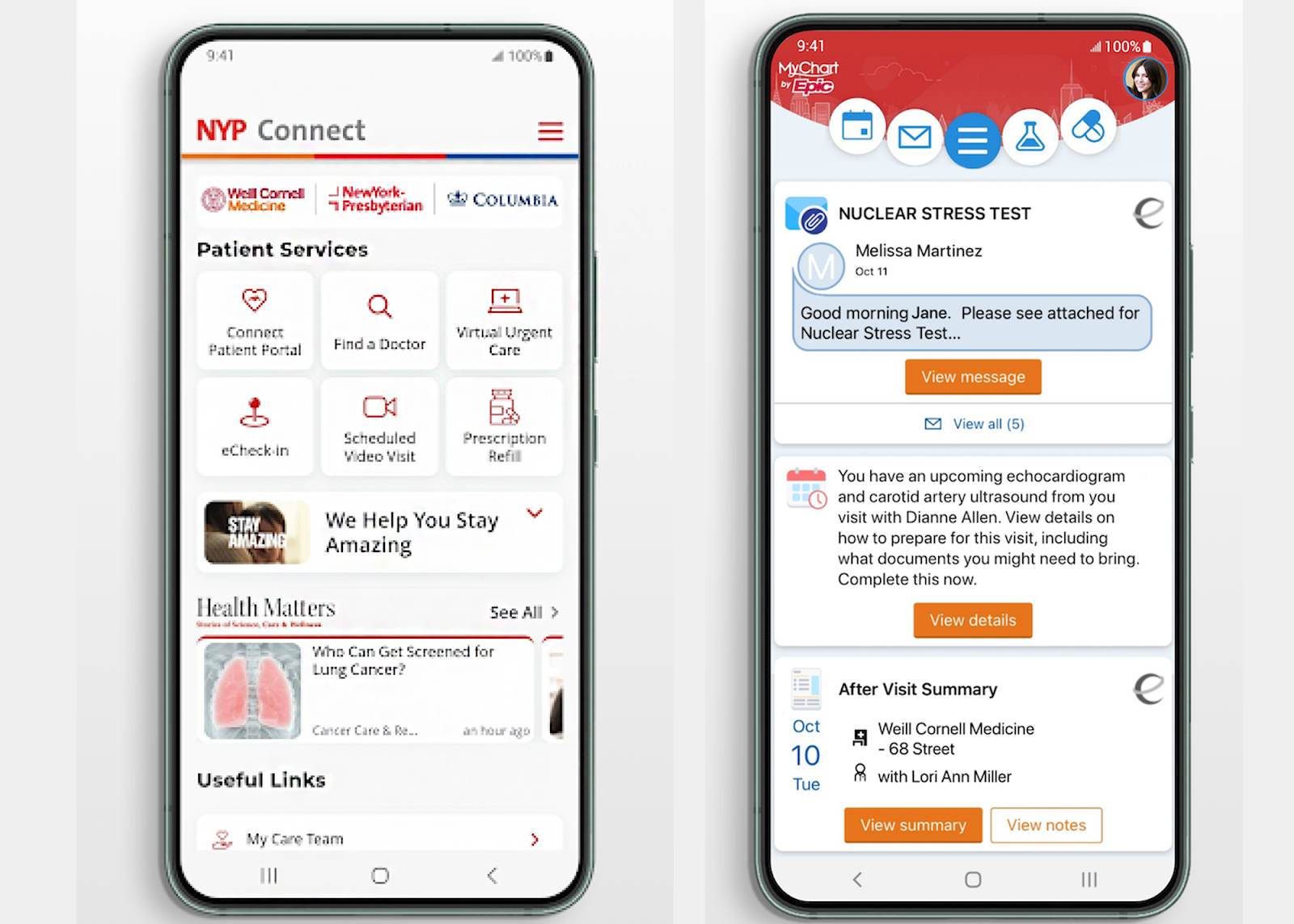
For example, New York-Presbyterian Hospital lets patients book virtual urgent care appointments directly on their website. Patients then download a secure app that lets them meet with healthcare professionals via video on desktop or mobile devices. Within the app, they can also request prescription refills, fill out forms, search for in-person doctors, and check in for appointments online.
Retail and eCommerce
UCaaS plays a huge role in the retail and eCommerce spaces, allowing customers to buy online and pick up in store, schedule deliveries or receive shippping updates via SMS, and get product/service advice via website chat.

UC tools also let companies like Alpyn Beauty send out automated marketing messages, including coupon codes and sale alerts, to customers who have opted-in to SMS marketing.
Education
Within the education sector, UCaaS tools are used to send campus-wide alerts and emergency notifications, allow students to view grades or sign up for classes online, and provide a virtual classroom experience.
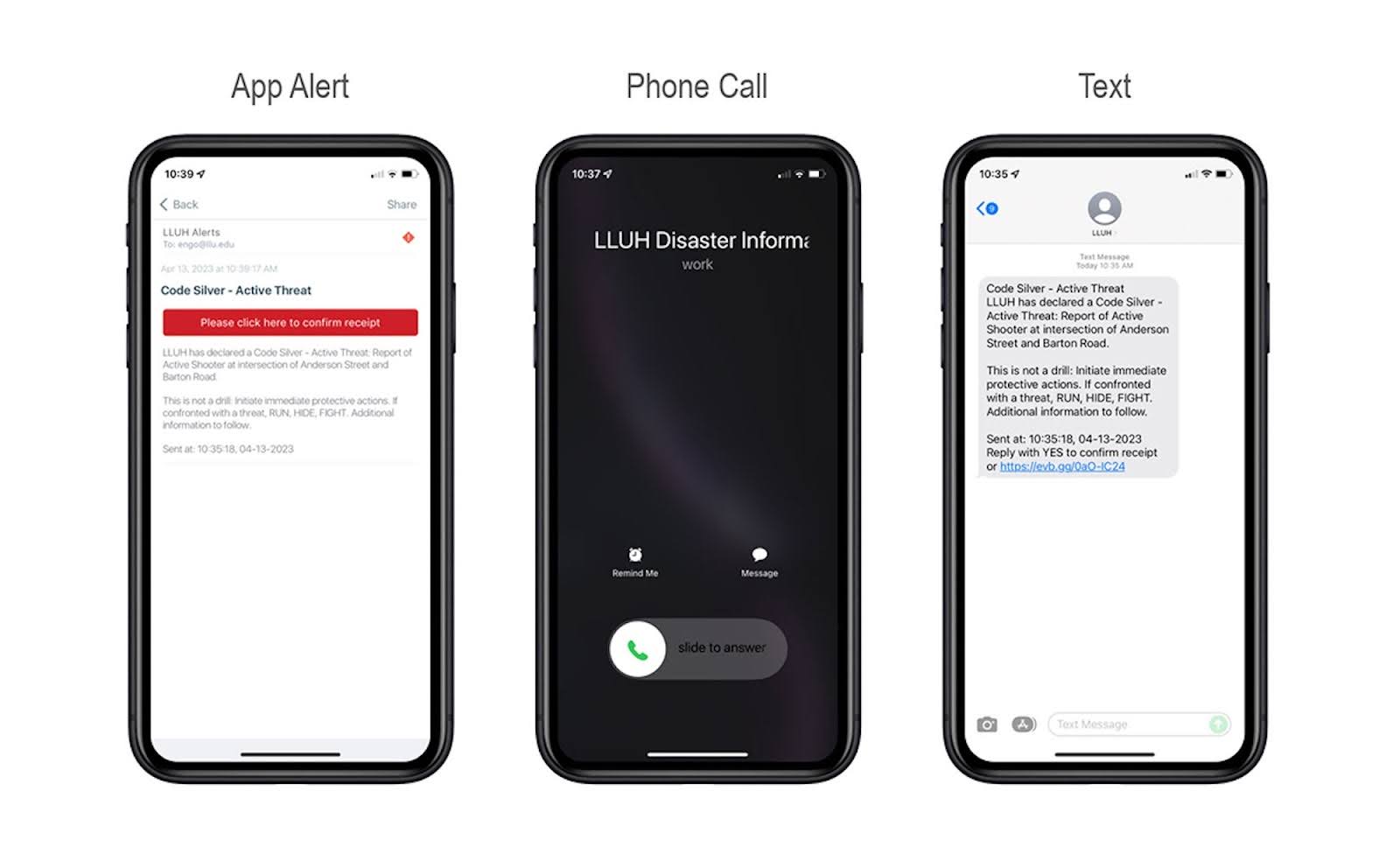
For example, Loma Linda University leverages UC platforms to send omnichannel campus emergency alerts to students and faculty.
Home Services Providers
With home service providers like pest control experts, landscapers, plumbers, or electricians, UC systems let customers book, reschedule, cancel, or receive notifications for upcoming appointments. UCaaS tools also enable virtual consultations with service providers.
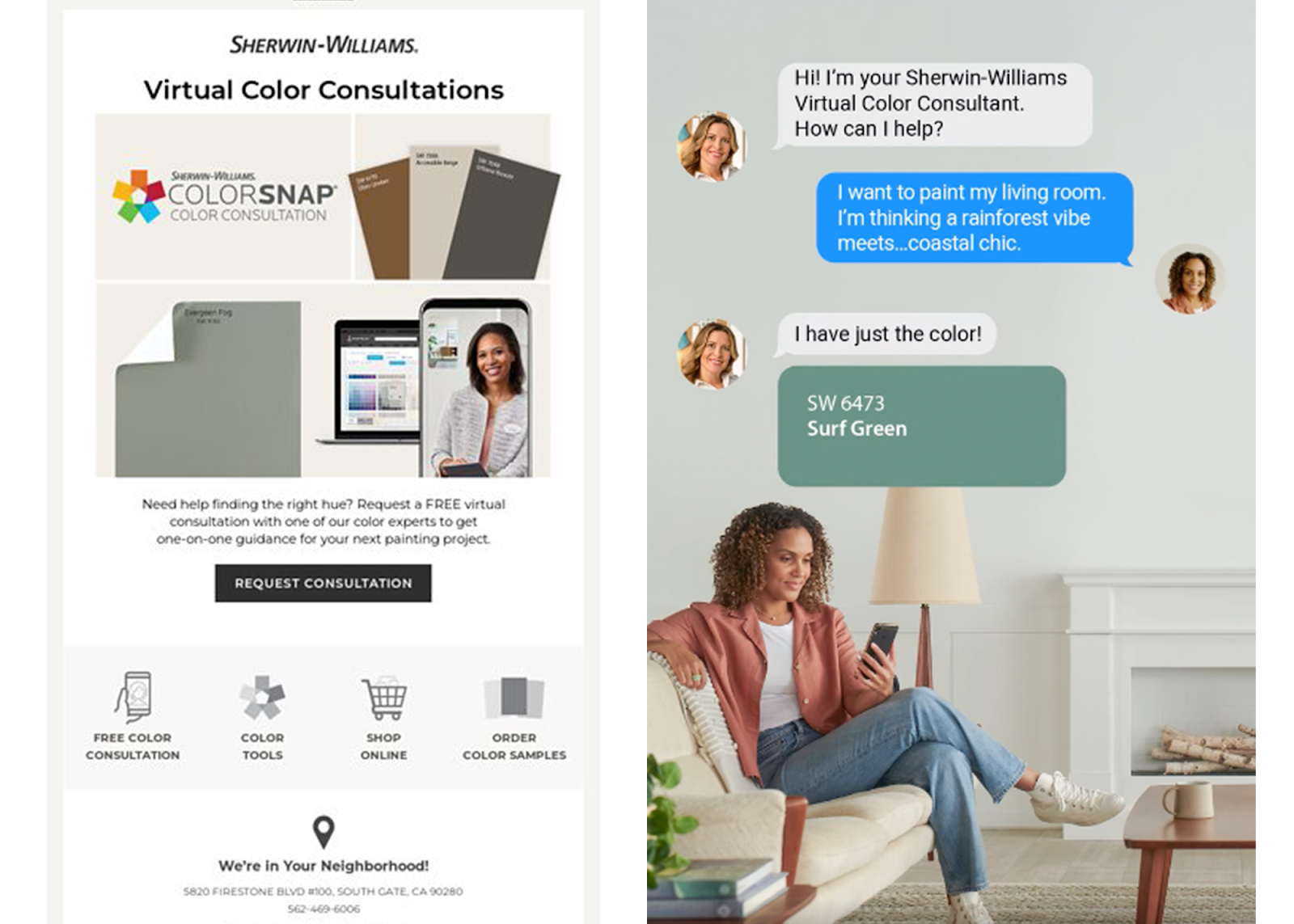
For example, Sherwin-Williams lets customers book virtual color consultations, providing a direct line of communication between industry pros and homeowners without compromising privacy.
The Future of Unified Communications
The UCaaS market is consolidating around a few clear shifts – UCaaS and CCaaS are merging into single platforms, performance management has moved from afterthought to baseline, and AI has gone from a marketing badge to the layer everything else runs on.
- UCaaS and CCaaS converge: More than half of customers will switch brands after a single bad experience [*], and providers have responded by collapsing internal collaboration and external customer contact into one stack. NICE, RingCentral, and Nextiva now ship combined platforms that pair omnichannel voice and digital channels with workforce management, conversational analytics, performance monitoring, and customer engagement tools in a single interface.
- Performance management becomes table stakes: UC used to mean voice, messaging, and a meeting room. Now Zoom, Dialpad, and Talkdesk bundle in-call agent coaching, scorecards, AI Agent Assist, custom surveys, and sentiment analysis as standard features. The performance management market is projected to reach $12.17 billion by 2032 [*], and some platforms now flag filler words and long pauses in real time during live calls.
- Generative AI moves from feature to foundation: Call and meeting summaries, automated message recaps, and suggested action items no longer count as differentiators. Enterprise GenAI adoption now tops 70% [*], and providers like 8x8, Genesys, and GoTo Connect ship these tools to every user by default. The bar has moved: businesses expect AI-drafted replies, instant search across call transcripts, and automatic ticket creation without lifting a finger.
- AI agents start answering for you: The bigger shift is autonomous voice and chat agents that resolve routine requests end to end, no human in the loop. These agents pull from your knowledge base, handle multi-turn conversations, take payments or book appointments, and escalate to a person only when they hit something they can't close. Providers are positioning them as the first line of contact rather than a deflection gimmick, which changes how teams staff and measure their support operations.
- Real-time AI assistance reshapes the agent's job: Live coaching is evolving past scorecards. Newer assistants listen during calls, surface the right knowledge article mid-sentence, draft the next response, and summarize the interaction before the agent has finished typing. The result is fewer screens to juggle and shorter handle times, but it also raises questions about accuracy, oversight, and how much teams should trust a model's suggestions in a regulated conversation.
- Voice AI gets harder to distinguish from people: Synthetic voices and conversational models have improved to the point where a caller may not know they're talking to software. That pushes new concerns to the front of buying decisions: data privacy, consent and disclosure rules, hallucination control, and the governance needed to keep an AI agent from confidently giving a wrong answer. Expect compliance and AI guardrails to become a standard line item on the evaluation checklist alongside uptime and pricing.
FAQs
Instantly compare Unified Communications providers for your needs
Personalized quotes 6 clicks away
How many employees do you have?
We'll match you with services for your company size.
GetVoIP's comparison guides made it easy to summarize services and make an informed and cost-effective decision.